Comparing runs
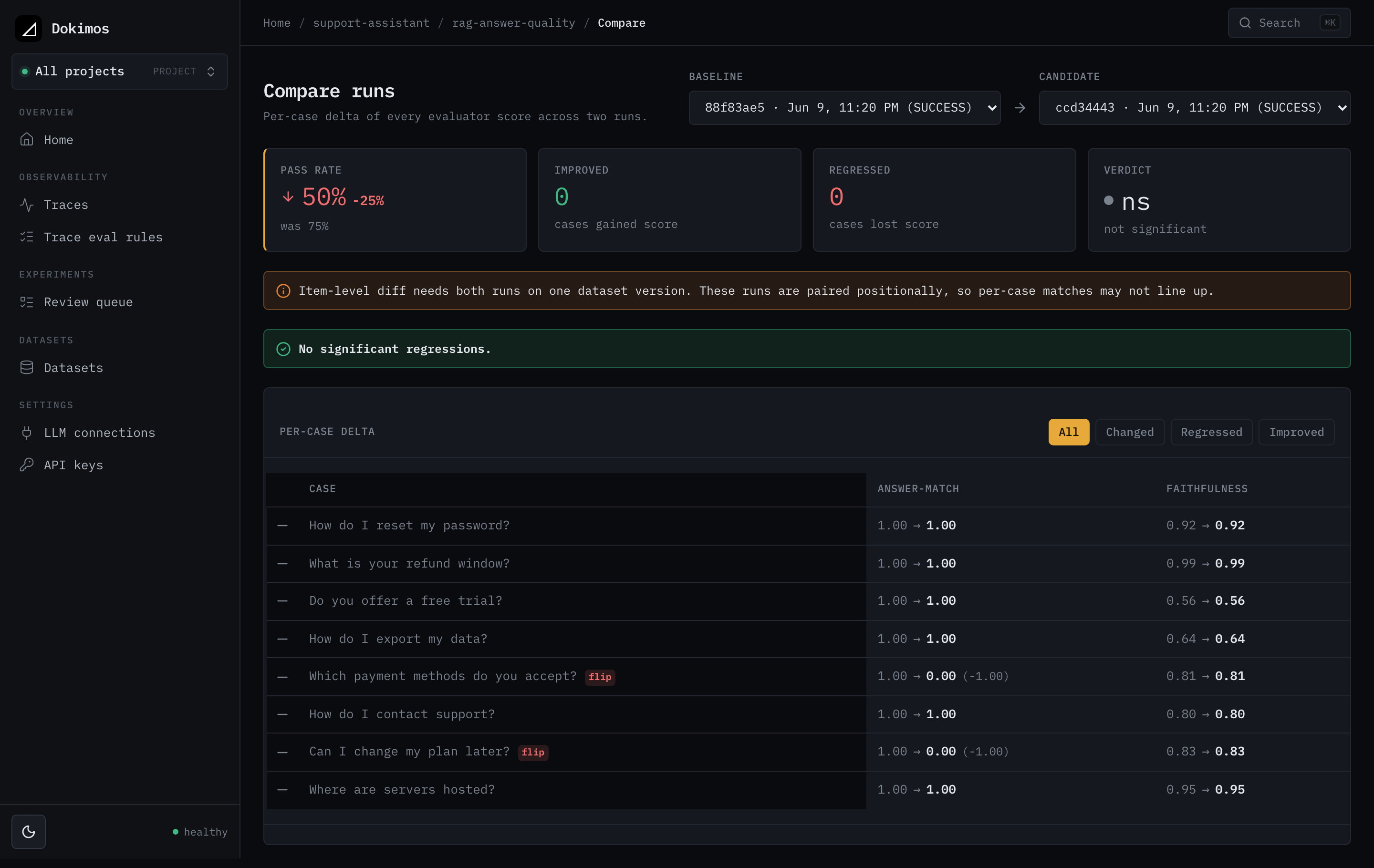
The diff view shows you what changed between two runs of the same experiment, item by item, so you can see what a change moved before it ships.
It is the same comparison the CI gate and regression alerting act on, shown as a table you can read.
Get a diff in one call
Compare a candidate run against a baseline run:
curl 'http://localhost:8080/api/v1/experiments/{experimentId}/runs/{candidateRunId}/diff?baselineRunId={baselineRunId}'
You get back a summary (the headline movement) and a page of cases (one row per item).
Two roles matter here:
- The candidate is the run under review (the new side).
- The baseline is what you compare against (the old side, usually the previous successful run).
baselineRunId is required. Both runs must be terminal. Comparing an in-flight run would be misleading, so the API returns 409 if either run has not finished.
Open the diff in the UI
From a run, open the comparison against its baseline. You land on this page in the web UI:
/experiments/{experimentId}/runs/{candidateRunId}/diff
The candidate is the run you opened. The baseline is the run you compare it against.
Filter the case list
By default the case list returns every item. Add the status parameter to narrow it:
curl 'http://localhost:8080/api/v1/experiments/{experimentId}/runs/{candidateRunId}/diff?baselineRunId={baselineRunId}&status=REGRESSED'
status value | Returns |
|---|---|
ALL (default) | Every item |
REGRESSED | Items that got worse |
IMPROVED | Items that got better |
CHANGED | Items that regressed or improved |
The case list is pageable. Use the standard page and size query parameters.
Read the summary
The summary reports the whole-run movement.
| Field | Meaning |
|---|---|
baselinePassRate, candidatePassRate, passRateDelta | Pass rate on each side, and candidate minus baseline |
significant | Whether the pass-rate change is statistically significant, not noise |
improvedCount, regressedCount, unchangedCount | How items moved between the runs |
addedCount, removedCount | Items present in only one of the two runs |
pairing | How items were matched: dataset_item_id (matched one to one by id) or positional (matched by position) |
Read a case
Each case is one item compared across the two runs. A case carries:
status:REGRESSED,IMPROVED,UNCHANGED,ADDED, orREMOVED.passFlip:truewhen the item flipped between pass and fail.input: the item's input text.evaluators: the per-evaluator deltas, so you can see which evaluator moved.
Each entry in evaluators has the evaluator name, its baselineMean and candidateMean, the delta (candidate minus baseline), a per-evaluator status (IMPROVED, REGRESSED, or UNCHANGED), and a significant flag for that evaluator's change.
How significance gating works
A change counts as a regression only when it clears two bars:
- It is beyond a small epsilon (not a rounding wobble).
- It is statistically significant.
The test depends on the data:
- McNemar's test for single-run pass/fail flips.
- A paired permutation test with a bootstrap interval otherwise.
A noisy judge nudging one item does not register as a regression. That is what keeps the gate and alerts from flaking. The significant flag in the summary is that same gate, surfaced so you can tell a real move from sampling noise.
Next steps
- CI regression gate: turn this comparison into a build pass or fail.
- Regression alerting: get a webhook when a comparison regresses.