Experiments
An experiment runs your LLM application against a whole dataset, scores every output, and hands you the totals. It is the main way to measure how well your application performs.
The pieces fit together like this. You wrap your application in a Task. You point the experiment at a Dataset. You attach one or more Evaluators to grade the outputs. You call run(), and you get an ExperimentResult with pass rates, scores, and per-item details.
Here is the shortest path from nothing to a number.
Run your first experiment
This builds a three-example dataset, runs your bot against it, grades each answer with an LLM judge, and prints the pass rate. Copy it, swap in your own bot and judge, and run it.
- Java
- Kotlin
import dev.dokimos.core.*;

// 1. Build a dataset (input + expected output per example)
Dataset dataset = Dataset.builder()
    .name("Product Support Questions")
    .addExample(Example.of(
        "How do I reset my password?",
        "Click 'Forgot Password' on the login page and follow the email instructions"
    ))
    .addExample(Example.of(
        "Where can I track my order?",
        "Go to your account dashboard and click on 'Order History'"
    ))
    .addExample(Example.of(
        "What payment methods do you accept?",
        "We accept credit cards, PayPal, and bank transfers"
    ))
    .build();

// 2. Wrap your application in a Task. It returns a map of outputs.
Task task = example -> {
    String answer = customerSupportBot.generateAnswer(example.input());
    return Map.of("output", answer);
};

// 3. Add evaluators to grade the outputs
List<Evaluator> evaluators = List.of(
    LLMJudgeEvaluator.builder()
        .name("Answer Quality")
        .criteria("Is the answer helpful and accurate?")
        .judge(judge)
        .threshold(0.8)
        .build()
);

// 4. Run it
ExperimentResult result = Experiment.builder()
    .name("QA Evaluation")
    .dataset(dataset)
    .task(task)
    .evaluators(evaluators)
    .build()
    .run();

// 5. Read the totals
System.out.println("Pass rate: " + String.format("%.2f%%", result.passRate() * 100));
System.out.println("Total examples: " + result.totalCount());
System.out.println("Passed: " + result.passCount());
System.out.println("Failed: " + result.failCount());
import dev.dokimos.kotlin.dsl.dataset
import dev.dokimos.kotlin.dsl.evaluators
import dev.dokimos.kotlin.dsl.experiment
import dev.dokimos.kotlin.dsl.llmJudge
import dev.dokimos.kotlin.dsl.task

// 1. Build a dataset (input + expected output per example)
val dataset = dataset {
    name = "Product Support Questions"
    example {
        input = "How do I reset my password?"
        expected = "Click 'Forgot Password' on the login page and follow the email instructions"
    }
    example {
        input = "Where can I track my order?"
        expected = "Go to your account dashboard and click on 'Order History'"
    }
    example {
        input = "What payment methods do you accept?"
        expected = "We accept credit cards, PayPal, and bank transfers"
    }
}

// 2. Wrap your application in a Task. It returns a map of outputs.
val task = task { example ->
    val answer = customerSupportBot.generateAnswer(example.input())
    mapOf("output" to answer)
}

// 3. Add evaluators and run it
val result = experiment {
    name = "QA Evaluation"
    dataset(dataset)
    task(task)
    evaluators {
        llmJudge(judge) {
            name = "Answer Quality"
            criteria = "Is the answer helpful and accurate?"
            threshold = 0.8
        }
    }
}.run()

// 4. Read the totals
println("Pass rate: %.2f%%".format(result.passRate() * 100))
println("Total examples: ${result.totalCount()}")
println("Passed: ${result.passCount()}")
println("Failed: ${result.failCount()}")
That is the full loop. The rest of this page goes deeper on each piece: tasks, datasets, parallelism, evaluators, results, CI, and exports.
When to use experiments vs JUnit
Dokimos also plugs into JUnit (see the @DatasetSource annotation). The two tools solve different problems.
| Aspect | JUnit tests with @DatasetSource | Experiments |
|---|---|---|
| Purpose | Unit and integration testing | Full-dataset evaluation and benchmarking |
| Execution | Individual test assertions | Batch run with aggregation |
| Results | Pass or fail per test | Pass rates, average scores, totals |
| Use case | CI/CD quality gates | Performance analysis and reporting |
| Flexibility | One example at a time | Whole datasets, trends over time |
| Output | Test reports (JUnit format) | Detailed results with statistics |
Reach for JUnit tests when you want to:
- Fail the build if critical cases don't pass
- Catch regressions fast during development
- Get immediate feedback on specific examples
Reach for experiments when you want to:
- Measure performance across a whole dataset
- Generate reports with metrics and trends
- Compare models or prompt versions
- Understand overall application behavior
Most projects use both.
Why bother
Manual testing with a few prompts does not scale. Experiments give you:
- Numbers you can track. Pass rates, average scores, and counts over time. Now you know whether a prompt change or model swap actually helped.
- Coverage. Run the whole dataset automatically instead of trying inputs by hand.
- Comparisons. Run different models, prompts, or retrieval strategies against the same cases.
- Regression alarms. Wire experiments into CI/CD so changes don't quietly break things.
- Failure patterns. When outputs go wrong, see which kinds of inputs fail and why.
Writing the Task
A Task runs your application for one example and returns its outputs. It is a single-method functional interface.
- Java
- Kotlin
@FunctionalInterface
public interface Task {
    Map<String, Object> run(Example example);
}
fun interface Task {
    fun run(example: Example): Map<String, Any>
}
The simplest task calls your model and returns one output:
- Java
- Kotlin
Task task = example -> {
    String response = myLlmService.generate(example.input());
    return Map.of("output", response);
};
val task = task { example ->
    val response = myLlmService.generate(example.input())
    mapOf("output" to response)
}
For RAG or other multi-step systems, return more than one value. Evaluators read these by key.
- Java
- Kotlin
Task ragTask = example -> {
    // Retrieve relevant documents
    List<String> retrievedDocs = vectorStore.search(example.input(), topK = 3);

    // Generate a response using the retrieved context
    String response = ragSystem.generate(example.input(), retrievedDocs);

    // Capture a confidence score
    double confidence = ragSystem.getConfidenceScore();

    return Map.of(
        "output", response,
        "retrievedContext", retrievedDocs,
        "confidence", confidence
    );
};
val ragTask = task { example ->
    // Retrieve relevant documents
    val retrievedDocs = vectorStore.search(example.input(), topK = 3)

    // Generate a response using the retrieved context
    val response = ragSystem.generate(example.input(), retrievedDocs)

    // Capture a confidence score
    val confidence = ragSystem.getConfidenceScore()

    mapOf(
        "output" to response,
        "retrievedContext" to retrievedDocs,
        "confidence" to confidence
    )
}
Recording tokens, cost, and latency
A plain Task returns only outputs, so each ItemResult carries null metrics. To record tokens, cost, and latency, return a MeasuredTask instead. It returns a TaskResult that holds the outputs plus a CallMetrics record, and those metrics flow through to every ItemResult.metrics().
@FunctionalInterface
public interface MeasuredTask {
    TaskResult run(Example example);
}
CallMetrics is a record with four nullable fields: tokensIn, tokensOut, costUsd, and latencyMs. Fill in what you can measure. Leave the rest null.
MeasuredTask task = example -> {
    long start = System.currentTimeMillis();
    LlmResponse response = myLlmService.generate(example.input());
    long latencyMs = System.currentTimeMillis() - start;

    CallMetrics metrics = new CallMetrics(
        response.promptTokens(),
        response.completionTokens(),
        response.costUsd(),
        latencyMs
    );

    return new TaskResult(Map.of("output", response.text()), metrics);
};

ExperimentResult result = Experiment.builder()
    .name("QA Evaluation")
    .dataset(dataset)
    .measuredTask(task)
    .evaluators(evaluators)
    .build()
    .run();
The plain task(Task) path still works the same. Use measuredTask(MeasuredTask) only when you want metrics on the results. The builder method has a separate name so a lambda passed to task(...) is never ambiguous between the two interfaces.
Running against a dataset
Load a dataset from a file
Experiments take any Dataset, including ones loaded from JSON or CSV on the classpath.
- Java
- Kotlin
// Load a dataset from the classpath
Dataset dataset = DatasetResolverRegistry.getInstance()
    .resolve("classpath:datasets/qa-dataset.json");

// Run the experiment
ExperimentResult result = Experiment.builder()
    .name("QA Evaluation")
    .dataset(dataset)
    .task(task)
    .evaluators(evaluators)
    .build()
    .run();
// Load a dataset from the classpath
val dataset = DatasetResolverRegistry.getInstance()
    .resolve("classpath:datasets/qa-dataset.json")

// Run the experiment
val result = experiment {
    name = "QA Evaluation"
    dataset(dataset)
    task(task)
    evaluators(evaluators)
}.run()
Inspect each result
After a run, loop over the items to see what happened on each example.
- Java
- Kotlin
ExperimentResult result = experiment.run();

// Walk every item result
for (ItemResult itemResult : result.itemResults()) {
    System.out.println("\nInput: " + itemResult.example().input());
    System.out.println("Expected: " + itemResult.example().expectedOutput());
    System.out.println("Actual: " + itemResult.actualOutputs().get("output"));
    System.out.println("Success: " + itemResult.success());

    // Check each evaluator's result for this item
    for (EvalResult evalResult : itemResult.evalResults()) {
        System.out.println("  " + evalResult.name() +
            ": " + (evalResult.success() ? "PASS" : "FAIL") +
            " (score: " + evalResult.score() + ")");
    }
}
val result = experiment.run()

// Walk every item result
result.itemResults().forEach { itemResult ->
    println("\nInput: ${itemResult.example().input()}")
    println("Expected: ${itemResult.example().expectedOutput()}")
    println("Actual: ${itemResult.actualOutputs()["output"]}")
    println("Success: ${itemResult.success()}")

    // Check each evaluator's result for this item
    itemResult.evalResults().forEach { evalResult ->
        val status = if (evalResult.success()) "PASS" else "FAIL"
        println("  ${evalResult.name()}: $status (score: ${evalResult.score()})")
    }
}
Find the failures
To debug, filter for items that did not pass.
- Java
- Kotlin
ExperimentResult result = experiment.run();

List<ItemResult> failures = result.itemResults().stream()
    .filter(item -> !item.success())
    .toList();

System.out.println("Failed cases: " + failures.size());
for (ItemResult failure : failures) {
    System.out.println("Failed input: " + failure.example().input());
    System.out.println("Expected: " + failure.example().expectedOutput());
    System.out.println("Got: " + failure.actualOutputs().get("output"));
}
val result = experiment.run()

val failures = result.itemResults().filterNot { it.success() }

println("Failed cases: ${failures.size}")
failures.forEach { failure ->
    println("Failed input: ${failure.example().input()}")
    println("Expected: ${failure.example().expectedOutput()}")
    println("Got: ${failure.actualOutputs()["output"]}")
}
One bad item never kills the run
If a task or evaluator throws on one example, the run keeps going. That example is recorded as a failed item (its success() is false, with no eval results), and execution moves to the next example. Sequential and parallel runs behave the same way, so one flaky call or one malformed output never costs you the rest of the dataset. Filter for !item.success(), as shown above, to inspect what failed.
Parallelism and multiple runs
Two builder settings control speed and statistical confidence: parallelism and runs.
Run examples concurrently
Set .parallelism(n) to process n examples at once within each run.
- Java
- Kotlin
ExperimentResult result = Experiment.builder()
    .name("Knowledge Assistant Evaluation")
    .dataset(dataset)
    .task(task)
    .evaluators(evaluators)
    .parallelism(4)  // run 4 examples at once
    .build()
    .run();
val result = experiment {
    name = "Knowledge Assistant Evaluation"
    dataset(dataset)
    task(task)
    parallelism = 4  // run 4 examples at once
    evaluators(evaluators)
}.run()
The default is 1 (sequential). Raise it for speed, but watch your API rate limits. When you set parallelism above 1, make sure your task is thread-safe.
Repeat the run for stability
Set .runs(n) to run the whole experiment n times.
- Java
- Kotlin
ExperimentResult result = Experiment.builder()
    .name("Knowledge Assistant Evaluation")
    .dataset(dataset)
    .task(task)
    .evaluators(evaluators)
    .runs(3)         // run the experiment 3 times
    .parallelism(4)  // parallelism within each run
    .build()
    .run();
val result = experiment {
    name = "Knowledge Assistant Evaluation"
    dataset(dataset)
    task(task)
    runs = 3          // run the experiment 3 times
    parallelism = 4   // parallelism within each run
    evaluators(evaluators)
}.run()
Runs go one after another. Parallelism applies inside each run. Repeating runs smooths out LLM non-determinism and gives you confidence in the numbers.
Read the run statistics:
result.averageScore("Faithfulness")     // mean across all runs
result.scoreStdDev("Faithfulness")      // standard deviation across runs
result.runCount()                       // number of runs performed
result.runs()                           // individual run results
A high standard deviation means your task or evaluator output is unstable.
Asynchronous tasks
The task and measuredTask paths block one thread per in-flight example. That is fine for blocking SDK calls. It is a poor fit when your task is already non-blocking, such as a Kotlin suspend function, a Reactor or CompletableFuture pipeline, or an agent runtime that hands you a future. For those, use an AsyncTask. It returns a CompletableFuture<TaskResult>, so the experiment drives many examples without parking a thread on each one.
@FunctionalInterface
public interface AsyncTask {
    CompletableFuture<TaskResult> run(Example example);
}
The completed future carries the same TaskResult (outputs plus optional CallMetrics) that measuredTask uses, so call metrics flow through to each ItemResult.metrics() just like on the synchronous paths.
Set it with asyncTask(...). An async task satisfies the task requirement on its own. You do not also call task(...) or measuredTask(...).
- Java
- Kotlin
import java.util.Map;
import java.util.concurrent.CompletableFuture;

AsyncTask task = example ->
    myAsyncLlmService
        .generateAsync(example.input())                 // returns CompletableFuture<String>
        .thenApply(answer -> TaskResult.of(Map.of("output", answer)));

ExperimentResult result = Experiment.builder()
    .name("QA Evaluation")
    .dataset(dataset)
    .asyncTask(task)
    .evaluators(evaluators)
    .parallelism(8)  // caps in-flight invocations at 8
    .build()
    .run();
import dev.dokimos.core.TaskResult
import dev.dokimos.kotlin.dsl.experiment

val result = experiment {
    name = "QA Evaluation"
    dataset(dataset)
    parallelism = 8  // caps in-flight invocations at 8
    suspendTask { example ->
        val answer = myAsyncLlmService.generate(example.input())  // a suspend call
        TaskResult.of(mapOf("output" to answer))
    }
    evaluators(evaluators)
}.run()
How the in-flight cap works
When you set an async task, the experiment runs on a dedicated non-blocking path. This path takes precedence over the sequential and parallel paths. Here parallelism no longer sizes a thread pool. Instead it caps the number of in-flight invocations with a semaphore. The experiment takes a permit before calling asyncTask.run(...) and releases it when that example's future settles, so at most parallelism invocations are ever outstanding. That stops a non-blocking task from launching the entire dataset at once and flooding a downstream service or rate limit. Dataset order is preserved in the returned results.
For tasks that bridge a blocking call onto a future (for example via CompletableFuture.supplyAsync(..., executor)), the real concurrency is the smaller of two limits: the experiment's parallelism cap, or the executor backing those calls. The semaphore caps how many futures are outstanding. The executor caps how many actually run at once. The Kotlin suspendTask {} DSL dispatches on Dispatchers.IO by default. The framework integrations build async tasks on top of asyncTask(...), see the Koog, LangChain4j, and Spring AI pages.
Failure isolation works the same
Async tasks isolate failures exactly like the synchronous paths. A future that completes exceptionally becomes a failed ItemResult (its success() is false, with no eval results), and the run continues with the rest. A task that throws synchronously from run(...), or returns a null future, is isolated the same way instead of aborting the run. Filter for !item.success() to see what failed, just like on the sequential and parallel paths.
The Kotlin suspendTask {} DSL
In Kotlin you rarely build an AsyncTask by hand. The suspendTask {} block inside experiment {} takes a suspend body that returns a TaskResult and bridges it to a CompletableFuture for you. There is also a top-level suspendTask(...) function, plus a suspendMapTask(...) overload that returns an output Map and wraps it in a TaskResult with no metrics, for building the task outside the DSL.
import dev.dokimos.core.TaskResult
import dev.dokimos.kotlin.dsl.suspendTask

val task = suspendTask { example ->
    val answer = myAsyncLlmService.generate(example.input())
    TaskResult.of(mapOf("output" to answer))
}

val result = experiment {
    name = "QA Evaluation"
    dataset(dataset)
    asyncTask(task)
    parallelism = 8
    evaluators(evaluators)
}.run()
Each invocation launches the suspend body on the given CoroutineScope (the IO dispatcher by default). Pass your own scope to either form to control where the work runs. A suspend exception surfaces as an exceptionally completed future, which the experiment isolates as a failed item.
Use an async task only when your caller is truly non-blocking. If your task is a plain blocking SDK call, the synchronous task(...) or measuredTask(...) path with parallelism(n) is simpler and gives you the same concurrency through its thread pool.
Configuring the experiment
Add a name, a description, evaluators, and metadata on the builder.
Name and description
- Java
- Kotlin
Experiment.builder()
    .name("Customer Support QA Evaluation")
    .description("Evaluating the assistant's ability to answer customer support questions accurately")
    .dataset(dataset)
    .task(task)
    .build();
experiment {
    name = "Customer Support QA Evaluation"
    description = "Evaluating the assistant's ability to answer customer support questions accurately"
    dataset(dataset)
    task(task)
}
Add evaluators
Add evaluators one at a time or as a list.
- Java
- Kotlin
// Add evaluators one by one
Experiment.builder()
    .name("QA Evaluation")
    .dataset(dataset)
    .task(task)
    .evaluator(exactMatchEvaluator)
    .evaluator(faithfulnessEvaluator)
    .evaluator(relevanceEvaluator)
    .build();

// Or add several at once
List<Evaluator> evaluators = List.of(
    exactMatchEvaluator,
    faithfulnessEvaluator,
    relevanceEvaluator
);

Experiment.builder()
    .name("QA Evaluation")
    .dataset(dataset)
    .task(task)
    .evaluators(evaluators)
    .build();
// Add evaluators one by one
experiment {
    name = "QA Evaluation"
    dataset(dataset)
    task(task)
    evaluators {
        evaluator(exactMatchEvaluator)
        evaluator(faithfulnessEvaluator)
        evaluator(relevanceEvaluator)
    }
}

// Or add several at once
val evaluatorList = listOf(
    exactMatchEvaluator,
    faithfulnessEvaluator,
    relevanceEvaluator
)

experiment {
    name = "QA Evaluation"
    dataset(dataset)
    task(task)
    evaluators(evaluatorList)
}
build() validates the experiment before it constructs it. It throws IllegalStateException if there is no dataset or task, if the dataset has no examples, or if no evaluators were added. You see configuration mistakes up front instead of at run time.
Close the reporter automatically
When you attach a Reporter with .reporter(...), you own its lifecycle by default. Set .autoCloseReporter(true) to have run() close the reporter once all runs finish, on top of flushing it. The default is false, which leaves the reporter open so you can reuse it across experiments.
Experiment.builder()
    .name("QA Evaluation")
    .dataset(dataset)
    .task(task)
    .evaluators(evaluators)
    .reporter(reporter)
    .autoCloseReporter(true)  // run() closes the reporter when done
    .build()
    .run();
Record configuration with metadata
Use metadata to record the settings behind each run. This helps when you compare results across model versions or configurations later.
- Java
- Kotlin
Experiment.builder()
    .name("GPT-5.2 Evaluation")
    .dataset(dataset)
    .task(task)
    .evaluators(evaluators)
    .metadata("model", "gpt-5.2")
    .metadata("temperature", 0.7)
    .metadata("timestamp", Instant.now().toString())
    .metadata("version", "1.0.0")
    .build();

// Or add several entries at once
Map<String, Object> metadata = Map.of(
    "model", "gpt-5.2",
    "temperature", 0.7,
    "maxTokens", 500
);

Experiment.builder()
    .name("GPT-5.2 Evaluation")
    .dataset(dataset)
    .task(task)
    .evaluators(evaluators)
    .metadata(metadata)
    .build();
experiment {
    name = "GPT-5.2 Evaluation"
    dataset(dataset)
    task(task)
    evaluators(evaluators)
    metadata("model", "gpt-5.2")
    metadata("temperature", 0.7)
    metadata("timestamp", Instant.now().toString())
    metadata("version", "1.0.0")
}

// Or add several entries at once
val metadata = mapOf(
    "model" to "gpt-5.2",
    "temperature" to 0.7,
    "maxTokens" to 500
)

experiment {
    name = "GPT-5.2 Evaluation"
    dataset(dataset)
    task(task)
    evaluators(evaluators)
    metadata(metadata)
}
Metadata rides along in the ExperimentResult, so you can use it to tell configurations apart.
Working with evaluators
Each evaluator gives a score from 0.0 to 1.0 and decides pass or fail against a threshold you set. Here are the common ones.
- Java
- Kotlin
// For deterministic outputs like calculations
Evaluator exactMatch = ExactMatchEvaluator.builder()
    .name("Exact Match")
    .threshold(1.0)
    .build();

// For output format checks (dates, phone numbers, etc.)
Evaluator formatCheck = RegexEvaluator.builder()
    .name("Date Format")
    .pattern("\\d{4}-\\d{2}-\\d{2}")  // YYYY-MM-DD
    .threshold(1.0)
    .build();

// For semantic correctness, using an LLM as judge
Evaluator semanticCorrectness = LLMJudgeEvaluator.builder()
    .name("Answer Correctness")
    .criteria("Is the answer factually correct and complete?")
    .evaluationParams(List.of(
        EvalTestCaseParam.INPUT,
        EvalTestCaseParam.EXPECTED_OUTPUT,
        EvalTestCaseParam.ACTUAL_OUTPUT
    ))
    .threshold(0.8)
    .judge(prompt -> judgeModel.generate(prompt))
    .build();

// For checking that RAG outputs are grounded in retrieved docs
Evaluator faithfulness = FaithfulnessEvaluator.builder()
    .name("Faithfulness")
    .threshold(0.7)
    .judge(prompt -> judgeModel.generate(prompt))
    .contextKey("retrievedContext")
    .build();
// For deterministic outputs like calculations
val exactMatch: Evaluator = exactMatch {
    name = "Exact Match"
    threshold = 1.0
}

// For output format checks (dates, phone numbers, etc.)
val formatCheck: Evaluator = regex {
    name = "Date Format"
    pattern = "\\d{4}-\\d{2}-\\d{2}"  // YYYY-MM-DD
    threshold = 1.0
}

// For semantic correctness, using an LLM as judge
val semanticCorrectness: Evaluator = llmJudge(judge) {
    name = "Answer Correctness"
    criteria = "Is the answer factually correct and complete?"
    params(
        EvalTestCaseParam.INPUT,
        EvalTestCaseParam.EXPECTED_OUTPUT,
        EvalTestCaseParam.ACTUAL_OUTPUT
    )
    threshold = 0.8
}

// For checking that RAG outputs are grounded in retrieved docs
val faithfulness: Evaluator = faithfulness(judge) {
    name = "Faithfulness"
    threshold = 0.7
    contextKey = "retrievedContext"
}
Score several dimensions at once
Real applications usually need more than one check. Add several evaluators and read each one's average score.
- Java
- Kotlin
List<Evaluator> evaluators = List.of(
    // Factual correctness
    LLMJudgeEvaluator.builder()
        .name("Correctness")
        .criteria("Is the answer factually correct?")
        .threshold(0.8)
        .judge(judge)
        .build(),

    // Relevance
    LLMJudgeEvaluator.builder()
        .name("Relevance")
        .criteria("Is the answer relevant to the question?")
        .threshold(0.7)
        .judge(judge)
        .build(),

    // Faithfulness to source
    FaithfulnessEvaluator.builder()
        .threshold(0.8)
        .judge(judge)
        .contextKey("retrievedContext")
        .build()
);

ExperimentResult result = Experiment.builder()
    .name("Multi-dimensional Evaluation")
    .dataset(dataset)
    .task(task)
    .evaluators(evaluators)
    .build()
    .run();

// Average score per evaluator
System.out.println("Correctness: " + result.averageScore("Correctness"));
System.out.println("Relevance: " + result.averageScore("Relevance"));
System.out.println("Faithfulness: " + result.averageScore("Faithfulness"));
val evaluators = evaluators {
    // Factual correctness
    llmJudge(judge) {
        name = "Correctness"
        criteria = "Is the answer factually correct?"
        threshold = 0.8
    }

    // Relevance
    llmJudge(judge) {
        name = "Relevance"
        criteria = "Is the answer relevant to the question?"
        threshold = 0.7
    }

    // Faithfulness to source
    faithfulness(judge) {
        threshold = 0.8
        contextKey = "retrievedContext"
    }
}

val result = experiment {
    name = "Multi-dimensional Evaluation"
    dataset(dataset)
    task(task)
    evaluators(evaluators)
}.run()

// Average score per evaluator
println("Correctness: ${result.averageScore("Correctness")}")
println("Relevance: ${result.averageScore("Relevance")}")
println("Faithfulness: ${result.averageScore("Faithfulness")}")
Reading the results
ExperimentResult carries the totals and the per-item detail. With multiple runs, all metrics are averaged across runs for you.
Totals
- Java
- Kotlin
ExperimentResult result = experiment.run();

// Overall metrics
System.out.println("Experiment: " + result.name());
System.out.println("Description: " + result.description());
System.out.println("Total examples: " + result.totalCount());
System.out.println("Passed: " + result.passCount());
System.out.println("Failed: " + result.failCount());
System.out.println("Pass rate: " + String.format("%.2f%%", result.passRate() * 100));

// Per-evaluator metrics
System.out.println("\nAverage scores:");
System.out.println("Exact Match: " + result.averageScore("Exact Match"));
System.out.println("Relevance: " + result.averageScore("Relevance"));

// For multi-run experiments, check stability
if (result.runCount() > 1) {
    System.out.println("\nScore stability (standard deviation):");
    System.out.println("Exact Match: " + result.scoreStdDev("Exact Match"));
    System.out.println("Relevance: " + result.scoreStdDev("Relevance"));
}
val result = experiment.run()

// Overall metrics
println("Experiment: ${result.name()}")
println("Description: ${result.description()}")
println("Total examples: ${result.totalCount()}")
println("Passed: ${result.passCount()}")
println("Failed: ${result.failCount()}")
println("Pass rate: %.2f%%".format(result.passRate() * 100))

// Per-evaluator metrics
println("\nAverage scores:")
println("Exact Match: ${result.averageScore("Exact Match")}")
println("Relevance: ${result.averageScore("Relevance")}")

// For multi-run experiments, check stability
if (result.runCount() > 1) {
    println("\nScore stability (standard deviation):")
    println("Exact Match: ${result.scoreStdDev("Exact Match")}")
    println("Relevance: ${result.scoreStdDev("Relevance")}")
}
Per-item detail
- Java
- Kotlin
// Access individual results
List<ItemResult> itemResults = result.itemResults();

for (ItemResult item : itemResults) {
    Example example = item.example();
    Map<String, Object> actualOutputs = item.actualOutputs();
    List<EvalResult> evalResults = item.evalResults();
    boolean success = item.success();

    // Your analysis here
}
// Access individual results
val itemResults = result.itemResults()

itemResults.forEach { item ->
    val example = item.example()
    val actualOutputs = item.actualOutputs()
    val evalResults = item.evalResults()
    val success = item.success()

    // Your analysis here
}
Metadata
- Java
- Kotlin
// Read experiment metadata
Map<String, Object> metadata = result.metadata();
System.out.println("Model: " + metadata.get("model"));
System.out.println("Temperature: " + metadata.get("temperature"));
// Read experiment metadata
val metadata = result.metadata()
println("Model: ${metadata["model"]}")
println("Temperature: ${metadata["temperature"]}")
Running experiments in CI/CD
Run experiments in CI to catch regressions before they ship. There are two ways to wire it up.
Option 1: a main class with an exit code
Write a main class that exits non-zero when results fall below your threshold.
- Java
- Kotlin
public class EvaluationPipeline {
    public static void main(String[] args) {
        Dataset dataset = DatasetResolverRegistry.getInstance()
            .resolve("classpath:datasets/qa-dataset.json");

        ExperimentResult result = Experiment.builder()
            .name("CI Validation")
            .dataset(dataset)
            .task(task)
            .evaluators(evaluators)
            .build()
            .run();

        System.out.println("Pass rate: " + result.passRate() * 100 + "%");

        // Fail the build if the pass rate is below threshold
        if (result.passRate() < 0.95) {
            System.err.println("❌ Evaluation failed: pass rate below 95%");
            System.exit(1);
        }

        System.out.println("✅ Evaluation passed!");
        System.exit(0);
    }
}
object EvaluationPipeline {
    @JvmStatic
    fun main(args: Array<String>) {
        val dataset = DatasetResolverRegistry.getInstance()
            .resolve("classpath:datasets/qa-dataset.json")

        val result = experiment {
            name = "CI Validation"
            dataset(dataset)
            task(task)
            evaluators(evaluators)
        }.run()

        println("Pass rate: ${result.passRate() * 100}%")

        // Fail the build if the pass rate is below threshold
        if (result.passRate() < 0.95) {
            System.err.println("❌ Evaluation failed: pass rate below 95%")
            kotlin.system.exitProcess(1)
        }

        println("✅ Evaluation passed!")
        kotlin.system.exitProcess(0)
    }
}
Option 2: a JUnit test
Wrap the experiment in a JUnit test for better reporting and IDE integration.
- Java
- Kotlin
import org.junit.jupiter.api.Test;
import static org.junit.jupiter.api.Assertions.*;

class LLMEvaluationTest {

    @Test
    void experimentShouldPassQualityThreshold() {
        Dataset dataset = DatasetResolverRegistry.getInstance()
            .resolve("classpath:datasets/qa-dataset.json");

        ExperimentResult result = Experiment.builder()
            .name("QA Evaluation")
            .dataset(dataset)
            .task(task)
            .evaluators(evaluators)
            .build()
            .run();

        // Assert the pass rate threshold
        assertTrue(result.passRate() >= 0.95,
            "Pass rate " + result.passRate() + " is below threshold 0.95");

        // Assert per-evaluator performance
        assertTrue(result.averageScore("Correctness") >= 0.8,
            "Correctness score too low");
    }
}
import org.junit.jupiter.api.Test
import kotlin.test.assertTrue

class LLMEvaluationTest {

    @Test
    fun experimentShouldPassQualityThreshold() {
        val dataset = DatasetResolverRegistry.getInstance()
            .resolve("classpath:datasets/qa-dataset.json")

        val result = experiment {
            name = "QA Evaluation"
            dataset(dataset)
            task(task)
            evaluators(evaluators)
        }.run()

        // Assert the pass rate threshold
        assertTrue(result.passRate() >= 0.95,
            "Pass rate ${result.passRate()} is below threshold 0.95")

        // Assert per-evaluator performance
        assertTrue(result.averageScore("Correctness") >= 0.8,
            "Correctness score too low")
    }
}
GitHub Actions example
name: LLM Evaluation

on: [push, pull_request]

jobs:
  evaluate:
    runs-on: ubuntu-latest

    steps:
      - uses: actions/checkout@v3

      - name: Set up JDK 21
        uses: actions/setup-java@v3
        with:
          java-version: '21'
          distribution: 'temurin'

      - name: Run LLM Evaluations
        env:
          OPENAI_API_KEY: ${{ secrets.OPENAI_API_KEY }}
        run: mvn test -Dtest=LLMEvaluationTest

      - name: Upload Evaluation Report
        if: always()
        uses: actions/upload-artifact@v3
        with:
          name: evaluation-results
          path: target/evaluation-results/
CI/CD tips
- Keep CI datasets small. Use a subset (20 to 50 examples) so builds stay fast. Run the full dataset nightly or weekly.
- Set realistic thresholds. Don't expect 100% right away. Start at something you can hit (say 80%) and raise it over time.
- Cache responses where you can. If you test the same examples often, cache LLM responses to save on API cost.
- Fail early. Put your most important evaluators first so obvious problems surface fast.
- Save detailed results. Upload results as build artifacts so you can review failures later.
LangChain4j integration
If you use LangChain4j, the dokimos-langchain4j module turns an AI Service into a Task in one call.
- Java
- Kotlin
import dev.dokimos.langchain4j.LangChain4jSupport;

// Your LangChain4j AI Service
interface Assistant {
    Result<String> chat(String userMessage);
}

Assistant assistant = AiServices.builder(Assistant.class)
    .chatLanguageModel(chatModel)
    .retrievalAugmentor(retrievalAugmentor)
    .build();

// Wrap it as a Task
Task task = LangChain4jSupport.ragTask(assistant::chat);

// Run the experiment
ExperimentResult result = Experiment.builder()
    .name("RAG Evaluation")
    .dataset(dataset)
    .task(task)
    .evaluators(evaluators)
    .build()
    .run();
import dev.dokimos.langchain4j.LangChain4jSupport
import dev.langchain4j.service.AiServices
import dev.langchain4j.service.Result

// Your LangChain4j AI Service
interface Assistant {
    fun chat(userMessage: String): Result<String>
}

val assistant = AiServices.builder(Assistant::class.java)
    .chatLanguageModel(chatModel)
    .retrievalAugmentor(retrievalAugmentor)
    .build()

// Wrap it as a Task
val task = LangChain4jSupport.ragTask(assistant::chat)

// Run the experiment
val result = experiment {
    name = "RAG Evaluation"
    dataset(dataset)
    task(task)
    evaluators(evaluators)
}.run()
ragTask() pulls the retrieved context out of Result.sources() and adds it to the outputs, so faithfulness evaluation works out of the box.
Best practices
Start small, then grow
Don't build a giant dataset up front. Start with 10 to 20 strong examples that cover your main cases. Run experiments often and add examples as you find edge cases.
Name experiments clearly
When you compare results later, you want to know exactly what each run tested.
- Java
- Kotlin
.name("gpt-5-nano-customer-support-temp0.7-2025-12-27")
name = "gpt-5-nano-customer-support-temp0.7-2025-12-27"
Track everything with metadata
Record model settings, versions, and timestamps so you can reproduce a result.
- Java
- Kotlin
.metadata("model", "gpt-5-nano")
.metadata("temperature", 0.7)
.metadata("prompt_version", "v3")
.metadata("timestamp", Instant.now().toString())
metadata("model", "gpt-5-nano")
metadata("temperature", 0.7)
metadata("prompt_version", "v3")
metadata("timestamp", Instant.now().toString())
Match evaluators to the job
- Use exact match for deterministic factual answers (like calculations).
- Use LLM judges when you need meaning, not exact text (like whether an explanation holds up).
- Use faithfulness for RAG, to confirm answers stay grounded in your documents.
- Build custom evaluators for domain-specific rules.
Set thresholds you can hit
Don't aim for perfect on day one. Start at 70 to 80% and raise the bar as the application improves.
Version your datasets
As you add cases, keep old versions so you can track how the application improves over time.
src/test/resources/datasets/
  ├── support-v1-initial.json
  ├── support-v2-edge-cases.json
  └── support-v3-current.json
Run experiments regularly
Schedule nightly or weekly runs to catch regressions early. Run a quick experiment on a smaller dataset during development.
Exporting results
Dokimos exports results to four formats for reporting, analysis, or handoff to other tools.
Pick a format
| Format | Best for |
|---|---|
| JSON | Programmatic access, storing results, further processing |
| HTML | Human-readable reports, sharing with stakeholders |
| Markdown | CI/CD logs, GitHub PR comments |
| CSV | Spreadsheet analysis, exploration |
Export to files or strings
Write to a file, or get the content back as a string.
- Java
- Kotlin
ExperimentResult result = experiment.run();

// Write to files
result.exportJson(Path.of("results/experiment.json"));
result.exportHtml(Path.of("results/report.html"));
result.exportMarkdown(Path.of("results/summary.md"));
result.exportCsv(Path.of("results/data.csv"));

// Get as strings (for inline use, PR comments, etc.)
String json = result.toJson();
String html = result.toHtml();
String markdown = result.toMarkdown();
String csv = result.toCsv();
val result = experiment.run()

// Write to files
result.exportJson(Path.of("results/experiment.json"))
result.exportHtml(Path.of("results/report.html"))
result.exportMarkdown(Path.of("results/summary.md"))
result.exportCsv(Path.of("results/data.csv"))

// Get as strings (for inline use, PR comments, etc.)
val json = result.toJson()
val html = result.toHtml()
val markdown = result.toMarkdown()
val csv = result.toCsv()
JSON format
The JSON export holds the full experiment data.
{
  "version": 1,
  "experimentName": "QA Evaluation",
  "timestamp": "2025-01-02T14:30:00Z",
  "description": "Testing customer support bot",
  "metadata": { "model": "gpt-5-nano" },
  "config": { "runs": 3 },
  "summary": {
    "totalExamples": 50,
    "passCount": 45,
    "failCount": 5,
    "passRate": 0.9,
    "runCount": 3,
    "evaluators": {
      "Faithfulness": {
        "averageScore": 0.85,
        "stdDev": 0.03,
        "passRate": 0.92
      }
    }
  },
  "items": [...]
}
For multi-run experiments, each item's evaluations include aggregated statistics.
{
  "evaluator": "Faithfulness",
  "averageScore": 0.85,
  "stdDev": 0.03,
  "scores": [0.82, 0.87, 0.86],
  "threshold": 0.8,
  "success": true
}
Markdown format
Markdown suits CI/CD logs and readable summaries.
# Experiment: QA Evaluation

**Date:** 2025-01-02 14:30:00
**Pass Rate:** 90% (45/50)

## Evaluator Summary

| Evaluator | Avg Score | Std Dev | Pass Rate |
|-----------|-----------|---------|-----------|
| Faithfulness | 0.85 | 0.03 | 92% |

## Failed Examples

### What is your return policy?
**Expected:** 30 days, full refund
**Actual:** You can return items within 60 days...
**Faithfulness:** 0.45 (FAIL): Claim not supported by context
HTML reports
Generate a standalone HTML report with styling built in.
- Java
- Kotlin
result.exportHtml(Path.of("reports/evaluation-report.html"));
result.exportHtml(Path.of("reports/evaluation-report.html"))
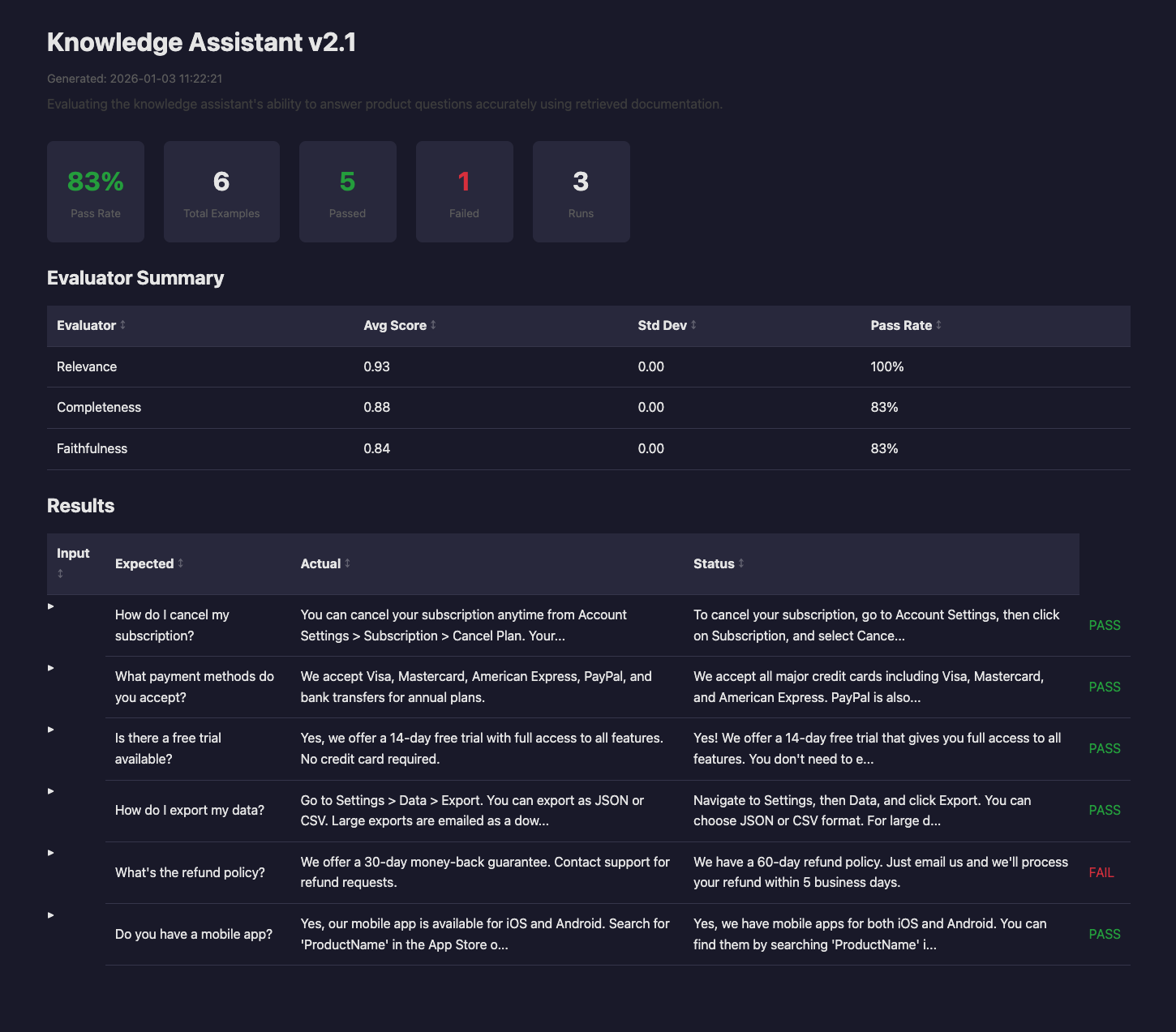
HTML reports include:
- Summary cards with pass rate and counts
- A sortable evaluator statistics table
- A results table with expandable rows for detail
- Pass and fail color coding
- Dark mode support
Here is what the layout looks like:
CSV export
CSV is handy for spreadsheet analysis.
- Java
- Kotlin
result.exportCsv(Path.of("results/data.csv"));
result.exportCsv(Path.of("results/data.csv"))
The columns are dynamic, based on the evaluators you used.
input,expected_output,actual_output,success,faithfulness_score,faithfulness_pass
"What is..?","30 days","You can...",true,0.92,true
Exporting in CI/CD
Export every format and print the markdown summary to the console.
- Java
- Kotlin
ExperimentResult result = experiment.run();

// Export all formats
Path outputDir = Path.of("target/evaluation-results");
result.exportJson(outputDir.resolve("results.json"));
result.exportHtml(outputDir.resolve("report.html"));
result.exportMarkdown(outputDir.resolve("summary.md"));
result.exportCsv(outputDir.resolve("data.csv"));

// Print the markdown summary to the console
System.out.println(result.toMarkdown());
val result = experiment.run()

// Export all formats
val outputDir = Path.of("target/evaluation-results")
result.exportJson(outputDir.resolve("results.json"))
result.exportHtml(outputDir.resolve("report.html"))
result.exportMarkdown(outputDir.resolve("summary.md"))
result.exportCsv(outputDir.resolve("data.csv"))

// Print the markdown summary to the console
println(result.toMarkdown())